November 4, 2026 · 11 min read · Pineflows team
What Is a Bracket Order? Entry, Stop and Target Explained
A bracket order is an entry order with a profit-taking limit and a protective stop attached, where filling one exit cancels the other. Its three linked legs turn your entry and exit decisions into a predefined trading workflow.
You might already know which stock you want to buy, but you're worried about what happens after you click submit. You can't watch every price change, and you don't want to improvise an exit while your position is losing money. A bracket lets you make those decisions beforehand, although the price you receive can differ from the level you planned.
Table of Contents
- What a Bracket Order Is and Its Three Legs
- How the Legs Activate in Sequence
- A Worked Long Trade From Entry to Exit
- Why a Stop Can Fill Below Its Price
- Deciding Whether a Bracket Order Fits Your Trades
- Setting One Up Without Costly Mistakes
What a Bracket Order Is and Its Three Legs
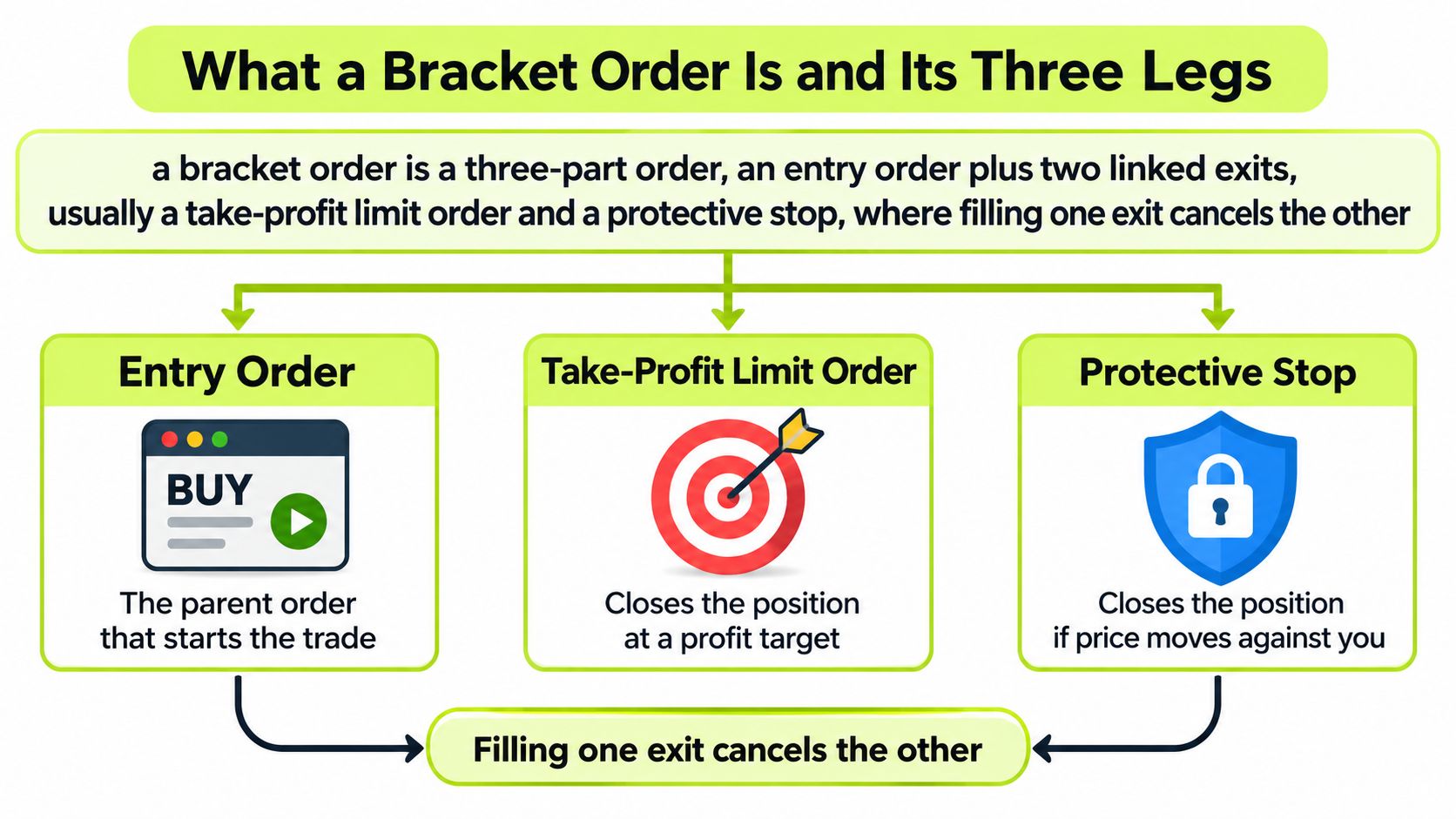
A bracket order combines the instruction that opens your position with the instructions intended to close it. The important distinction is linked orders, not just several orders sitting in your account.
Think of a shelf bracket, with the entry in the middle and the exits forming boundaries around it. For a long trade, the profit target sits above the entry and the protective stop sits below. For a short trade, those positions reverse.
Interactive Brokers' order-type guide describes the three-part structure as a parent entry with attached profit-taking and protective exit orders. The diagram shows how those relationships fit together.
Bracket order legs for long and short trades
| Leg | Long position | Short position | Order type |
|---|---|---|---|
| Entry (parent) | Buy at your entry price | Sell short at your entry price | Limit or market |
| Take-profit (child) | Sell limit above entry | Buy limit below entry | Limit |
| Stop-loss (child) | Sell stop below entry | Buy stop above entry | Stop (market) or stop-limit |
The parent order starts the trade. A limit entry specifies an acceptable price, while a market entry prioritizes execution at the available market price.
The take-profit child closes the position when its limit conditions can be met. A long trader sells to close; a short trader buys back the borrowed shares.
The protective child provides an exit instruction for an unfavorable move. Its quantity normally matches the parent, as does the take-profit quantity, so either exit can close the entire position rather than leave a remainder.
The broker connects the children to the parent through an order identifier. That relationship lets the broker hold the exits until the entry executes and cancel or adjust the unused alternative after an exit fills.
Practical rule: A bracket defines intended exit levels. It doesn't guarantee the prices at which you'll actually exit.
How the Legs Activate in Sequence
A bracket is easier to understand as a sequence of order states than as a collection of price lines. Before the entry fills, you have instructions for a possible position. After it fills, you have a position that needs active exit instructions.
The opening stages look like this.
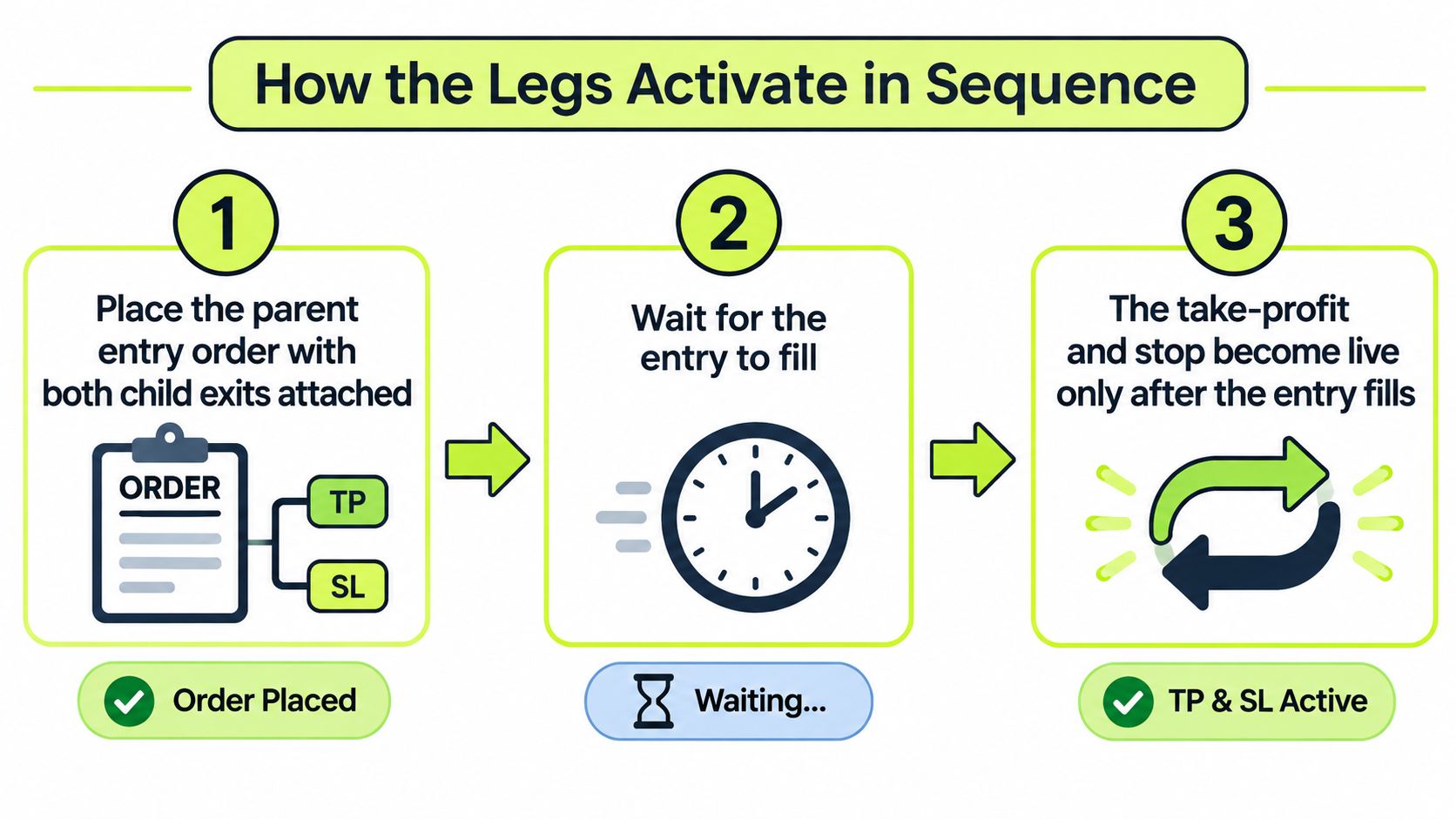
- Submit the complete bracket. Place the parent entry with both children attached so the broker receives the conditional relationships, not unrelated trading instructions.
- Wait for the entry to fill. An accepted or working entry isn't an executed trade. If it remains unfilled, the children shouldn't act as independent exits.
- Confirm that the exits become active. Once the parent executes, the broker activates the appropriate children for the filled position.
- Let an eligible exit execute. The target must meet its limit conditions; the stop must reach its trigger conditions before its resulting order can execute.
- Check cancellation of the unused exit. After the position closes, the remaining child should no longer be available to create an unintended trade.
A stop trigger isn't an exit fill
FINRA's explanation of order types distinguishes a limit instruction, which trades at its specified price or better, from a stop instruction, which becomes a market order after activation. Under the transaction-based trigger convention, a sell stop activates at or below its stop price, while a buy stop activates at or above it.
That distinction matters when you read order status. Triggered tells you the stop condition occurred. Filled tells you an execution happened.
The linked exit relationship is commonly called one-cancels-other. An OCO order focuses on the alternatives, while a bracket also includes the parent entry that establishes the position.
Electronic parent-child linking replaces the manual task of entering a trade, waiting for execution, and then managing separate exits. It doesn't turn the bracket into an investment strategy. You still choose the instrument, direction, size, and levels.
For another way to follow the order sequence, use this video alongside the status changes on your broker's order screen.
For a straightforward, fully filled trade, a healthy log shows an entry fill, an exit fill, and cancellation of the unused alternative. Partial fills require closer inspection of the remaining position and working quantities.
A Worked Long Trade From Entry to Exit
Consider a hypothetical trade: buy 100 shares with a $100 limit entry, attach a $110 take-profit sell limit, and use a $95 protective sell stop. All prices and outcomes below are illustrative, exclude commissions and fees, and assume a complete entry fill at the stated price whenever the entry executes.
The planned gain is the distance from entry to target multiplied by the share quantity. The planned loss uses the distance from entry to stop, but that calculation isn't a promise about the actual exit.
Worked example with different fill outcomes
Each row is an alternative outcome for the same proposed trade, not a sequence of trades.
| Scenario | Trigger | Actual fill | Result |
|---|---|---|---|
| Target reached | Price reaches $110 and the sell limit executes | Entry $100; exit $110 | $1,000 gain; stop canceled |
| Stop hit cleanly | Price trades at $95 | Entry $100; stop-market exit $94.80 | $520 loss; target canceled |
| Overnight gap | Stock opens at $88, below the stop | Entry $100; stop-market exit $88.10 | $1,190 loss; target canceled |
| Entry never fills | Price stays above $100 | No fill | $0, no exit orders active |
Start by comparing trigger, actual fill, and result. The target outcome uses the planned entry and target prices. The loss outcomes show why the stop line on your chart isn't enough to calculate what you'll lose.
In the target scenario, the hypothetical profit is ($110 − $100) × 100 = $1,000. Once that exit fills, the broker cancels the protective alternative.
In the ordinary stop scenario, the trigger occurs at $95, but the market order fills at $94.80. The loss becomes ($100 − $94.80) × 100 = $520, rather than the planned $500. That $0.20 per share difference is slippage.
Calculate the trade result from the execution price, not from the label on the stop order.
The gap changes the exposure
The overnight scenario is more severe. The stock opens below the stop, and the hypothetical exit at $88.10 produces a loss of ($100 − $88.10) × 100 = $1,190.
The trader didn't choose to widen the stop. There was no execution at the intended level. For position sizing, test an adverse fill assumption as well as the planned stop; don't describe either assumption as an absolute worst case.
If the entry never fills, the proposed trade produces no position and no trading gain or loss. The attached children may still appear as held instructions, but they aren't active exits.
A short trade mirrors the logic. Suppose you sell 100 shares short at $100, set a $90 buy-limit target, and attach a $105 buy stop. If the stop triggers and the buy fills at $105.20, the hypothetical loss is ($105.20 − $100) × 100 = $520. Slippage works against the short seller through a higher purchase price.
Why a Stop Can Fill Below Its Price
A stop-loss isn't a guaranteed maximum loss. The stop price tells the broker when to activate an instruction, not necessarily the price a buyer will pay for your shares.
Wealthsimple's bracket-order guide explains the execution risk behind that distinction: stop-market fills can be worse during fast markets, low liquidity, overnight gaps, or trading halts. The bracket can coordinate the exit instructions, but it can't create available liquidity at your preferred price.
During a sharp decline, buyers may withdraw or offer lower prices before your sell order executes. Following a halt, trading may resume beyond your stop. In either situation, the next available fill can leave you with a larger loss than your original calculation.
Market stop versus stop-limit exit
| Stop type | After the trigger | Price control | Main risk |
|---|---|---|---|
| Stop (market) | Becomes a market order seeking the best available price | No specified execution-price boundary; a long exit can fill below the stop | Slippage in fast markets, gaps, and trading halts |
| Stop-limit | Becomes a limit order at your set limit price | Any fill must be at the limit or better | May not fill, leaving the position open as price moves away |
A stop-limit changes the trade-off rather than removing risk. If buyers won't meet your sell limit, you keep the shares while their market value may continue falling.
A market stop prioritizes attempting to exit over controlling the execution price. A stop-limit prioritizes the acceptable price over completing the exit. Neither gives you both guaranteed execution and a guaranteed price.
Choose which failure you're prepared to manage: a worse fill, or an unfilled exit with the position still open.
Automation adds a separate question: can you confirm what the broker did? At Pineflows, we mark an order unknown when we can't confirm Robinhood's response after submission, and we never re-place it. We can't cancel or reverse an order once it's sent.
That's why stop selection belongs in the pre-entry review. Don't depend on a later pause or cancellation attempt to rescue an instruction that's already on its way to execution.
Deciding Whether a Bracket Order Fits Your Trades
Ask yourself: Do I define my entry, target, and stop before trading? Can I accept an exit worse than my stop? Can I check the broker's order status afterward? Your answers matter more than whether the ticket looks convenient.
A bracket can suit a trader who prepares levels before the session, needs to step away from the screen, or wants to avoid moving a stop during an emotional moment. It can also provide a useful model for planning alert-driven entries, provided you distinguish broker-native attached orders from software that sends separate execution signals.
Benefits worth using deliberately
- A complete plan at entry. You decide what would justify taking profit and what would invalidate the trade before committing capital.
- Less manual exit handling. The broker manages linked instructions instead of requiring you to submit each exit after entry.
- Visible planned risk and reward. You can compare the intended loss and gain before accepting the position.
- Coordinated cancellation. The unused exit is intended to disappear when the other closes the trade.
Convenience isn't a reason to accept unsuitable levels. If you can't explain why the target and stop belong where you've placed them, attaching them doesn't improve the decision.
Trade-offs to accept before submitting
- Ordinary price noise can trigger an exit. A tight fixed stop may close a trade before your broader idea has failed.
- A limit entry can remain unfilled. Missing a trade is a possible outcome, not an order malfunction.
- Market exits can slip. Your sizing should leave room for execution uncertainty.
- Broker implementation matters. Default offsets, supported stop types, and partial-exit handling aren't interchangeable.
For readers planning swing trading on Robinhood, overnight exposure deserves particular attention. A bracket doesn't make an unattended position immune to a gap.
Pineflows connects TradingView strategy alerts to Robinhood execution and starts in test mode, logging alerts without submitting orders until you enable live trading. Our pause control blocks new entries while keeping valid exits available, but we place market orders only, for US equities and ETFs. That isn't the native limit-and-stop bracket illustrated above.
You must still watch your automations. Alerts can arrive late, twice, or not at all; markets move, and brokers reject orders. Write down the entry, target, stop, and an adverse fill assumption for a planned trade, then confirm that your actual execution method matches that plan before going live.
Setting One Up Without Costly Mistakes
Use the order preview as a final review of instructions, not just a confirmation screen. Interactive Brokers' bracket-order documentation describes opposing child exits linked to a parent and cancellation of the unused child after an exit executes.
A pre-submission checklist
- Confirm the trade direction. A long needs selling exits, with its target above entry and stop below; a short needs buying exits in the opposite arrangement. This prevents an exit from adding to the position.
- Check the stop's location against the current market. A sell stop entered above the current price may already meet the trigger condition or be rejected. Don't confuse a stop trigger with a profit-taking limit.
- Match child quantities to the intended position. Unless your broker explicitly supports partial-exit brackets, use matching quantities. Undersized exits can leave shares open; oversized exits can create unwanted exposure.
- Inspect default offsets. Replace presets with your intended instrument-specific levels. A convenient default isn't evidence that the distance suits the stock or your strategy.
- Verify the cancellation relationship. Confirm that an executed exit cancels or appropriately adjusts its alternative. An independent leftover order can trade after your original position is closed.
- Test the workflow before increasing size. Use a simulated environment where available, then inspect activation, fills, and cancellation statuses. A smaller live position reduces exposure but doesn't eliminate execution risk.
Choose the stop type explicitly during that review. Accepting slippage and accepting the possibility of an unfilled stop-limit are different decisions.
Before submitting: Read the ticket as instructions to buy or sell, not merely as lines drawn on a chart.
For an alert-based workflow, include the account and execution checks relevant to Robinhood stock trading. Even a correctly configured setup needs monitoring for late signals, rejected orders, partial fills, and exits that remain unfilled.
Pineflows turns TradingView strategy alerts into Robinhood market orders, with test-first logging, pause controls, and fill-status visibility. Visit Pineflows to test your alert workflow before enabling live execution, and confirm that its market-order approach matches your entry and exit plan.